UX / Product Design · Case Study
Designers ship real code by working with an AI agent.
I designed and built an end-to-end workflow for a UX team working on an enterprise IoT-connectivity platform. This is not an AI prototyping tool: designers start structured activities that read the Jira ticket, pull context from the project's knowledge vault, and assemble screens from the design system's Storybook components and interaction patterns. The designer reviews the result live in a local dev server, iterates, and opens a pull request a front-end lead reviews and merges into the product.
This is neither a mockup tool nor a no-code toy. The pipelines are deterministic where it matters: two designers working the same ticket get roughly the same result, screens built from the same components and patterns. What differs is taste and fine-tuning.
The whole project, at a glance.
The arc of the work, top to bottom. Open any step for a quick deeper read, or jump straight into the full section.
-
01
The pipelines pull context from the project's knowledge vault and assemble screens from the design system, so two designers on the same ticket get roughly the same result. The designer reviews live, iterates, and opens a pull request a front-end lead merges.
-
02
Session open loads context silently; the build loop is incremental and designer-confirmed; session close updates memory and the ticket. Read the full section →
-
03
Memory tiers and a layered system keep the agent grounded in product context, the design system, and team conventions, without the designer configuring anything. Read the full section →
-
04
The designer picks a mode to match the task instead of writing one giant prompt; each mode shapes how the agent works and what it produces. Read the full section →
-
05
Designers own the design branches; developers own develop and main. The boundary removes shared-file collisions by structure, not by asking people to be careful. Read the full section →
-
06
Quality is built into the loop: the agent flags a request that contradicts a prior decision, and automated scans catch hardcoded values on the spot, so everything ships on the design system. Read the full section →
-
07
Three artifacts per feature keep the work reviewable and stop the design diverging from the shipped product. Read the full section →
The shape of the workflow
From a ticket to merged code, in one continuous session.
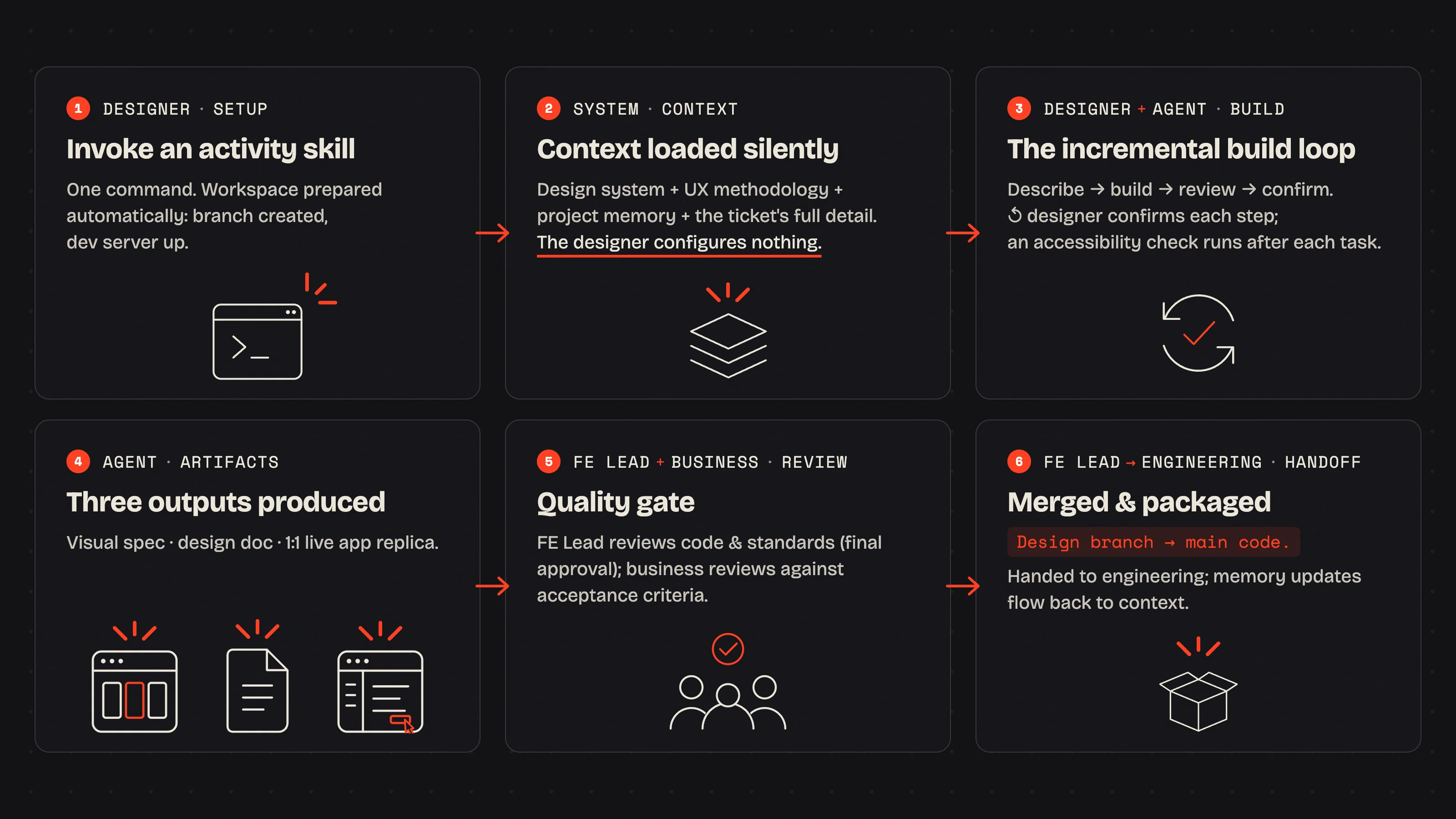
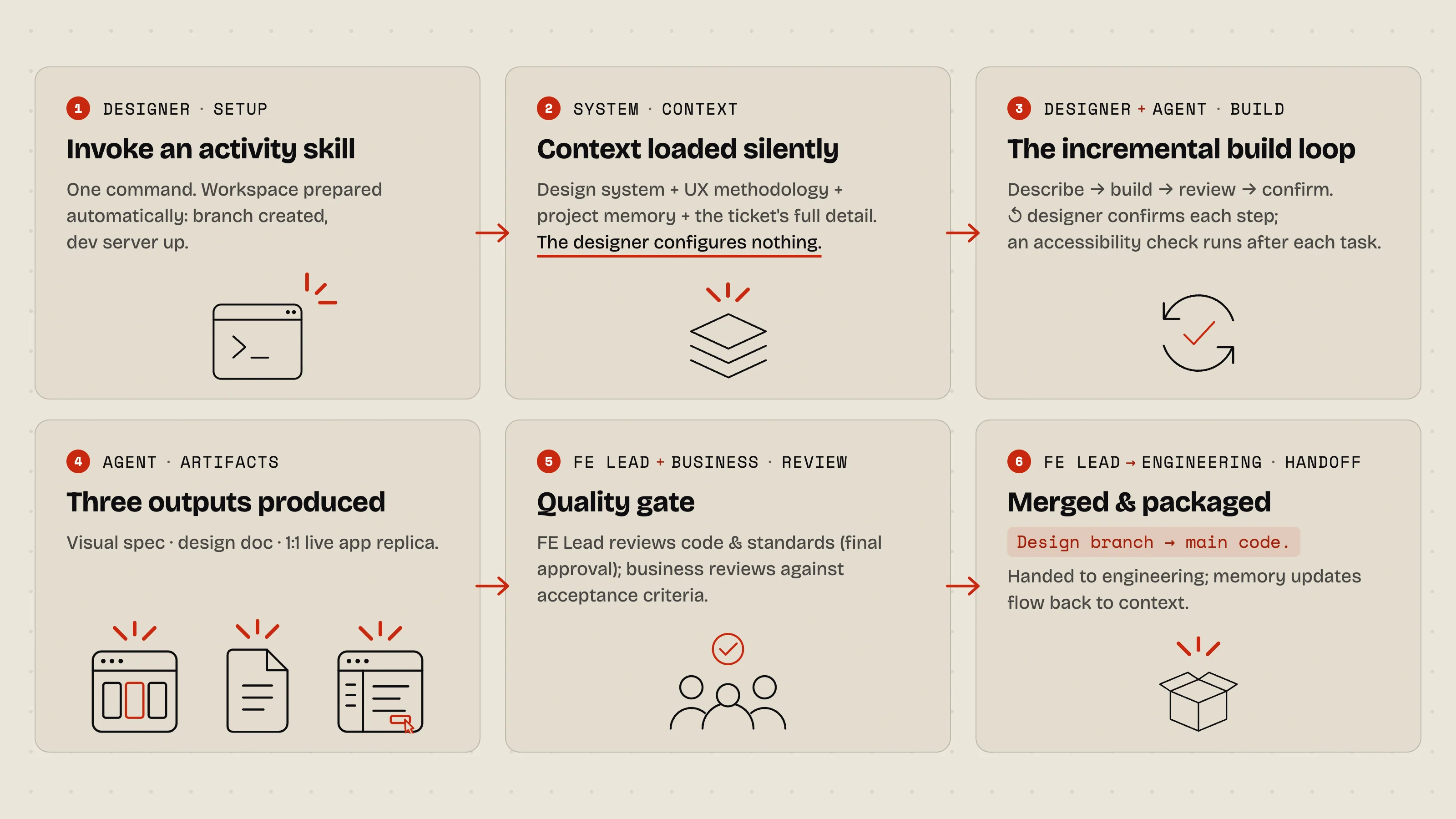
The governing principle is simple: remove every barrier between a UX decision and a working screen. A designer opens a session, picks a ticket, and builds the feature live, speaking in design intent while the agent handles the engineering standards underneath. Three rituals frame the work.
1 · Session open · an automated ritual
The designer types one command. Before the first design prompt, the system silently:
- Reads the project memory files: product context, decisions to date, current goals, known constraints.
- Loads the design system, UX methodology, and team conventions as skills.
- Fetches the designer’s open tickets from the issue tracker and lists them.
- Starts the local dev server if it isn’t already running.
The designer configures nothing. By the time the first prompt is typed, the context is already there.
2 · The build loop · incremental, designer-confirmed
The repeating interaction at the heart of every session: the designer describes what they want in plain language (“Add an empty state to this list with a primary action to create the first item”), and the agent builds it with real design-system components pulled from the Storybook repo, hot-reloaded in the browser. The designer reviews the change live and either confirms or redirects. Nothing advances without confirmation.
One guardrail watches the loop. Before writing, the agent checks each request against the logged decisions; if something contradicts one, it surfaces the conflict first: “this conflicts with the decision made on [date]; revisit or proceed?”
3 · Session close · an automated ritual
The designer signals the session is done. The system then:
- Updates the project memory with any new patterns, decisions, and the current build state.
- Posts a summary comment to the ticket: what was built, what was deferred, the PR link.
- Advances the ticket status and reminds the designer to commit and open the PR.
System architecture
Three structures hold the workflow up.
The workflow is built on three foundations rather than a single clever prompt: a memory model that survives the AI’s amnesia, a set of activity skills that load the right context for the job, and a layer model that keeps the code clean enough to ship.
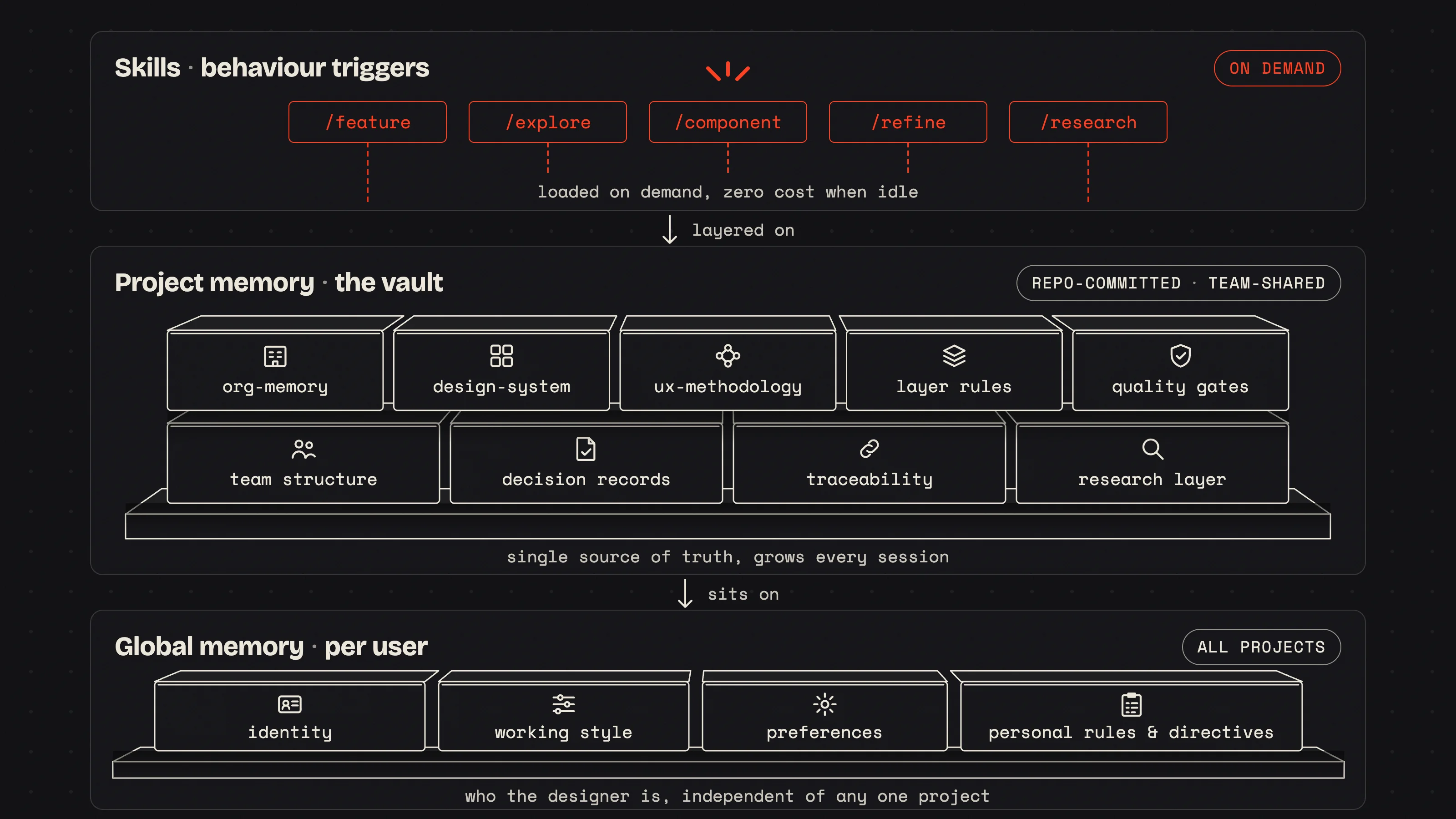
A · A two-layer memory model
The AI has no memory between sessions, its context resets on a fixed cycle, so every session is a cold start. The workflow treats that statelessness as a design material rather than a bug, and rebuilds context two ways.
| Layer | What it is | When it loads |
|---|---|---|
| Persistent memory (the vault) | A repo-committed, team-shared knowledge base, in effect the agent's second brain: product brief, team structure, design decisions and rationale, component patterns, meeting outcomes (date-stamped, treated as hard constraints), traceability, and quality gates. | Always: read at the start of every session. |
| On-demand skills | Focused capability files: design-system inventory, UX methodology, team conventions, workspace setup, user-research findings and user-interview data. They only cost context when the task needs them. | Loaded by the activity skill that needs them; never all at once. |
The system is deliberately token-frugal: a small always-on core loads at session start, and everything else streams in on demand, so the working session stays sharp.
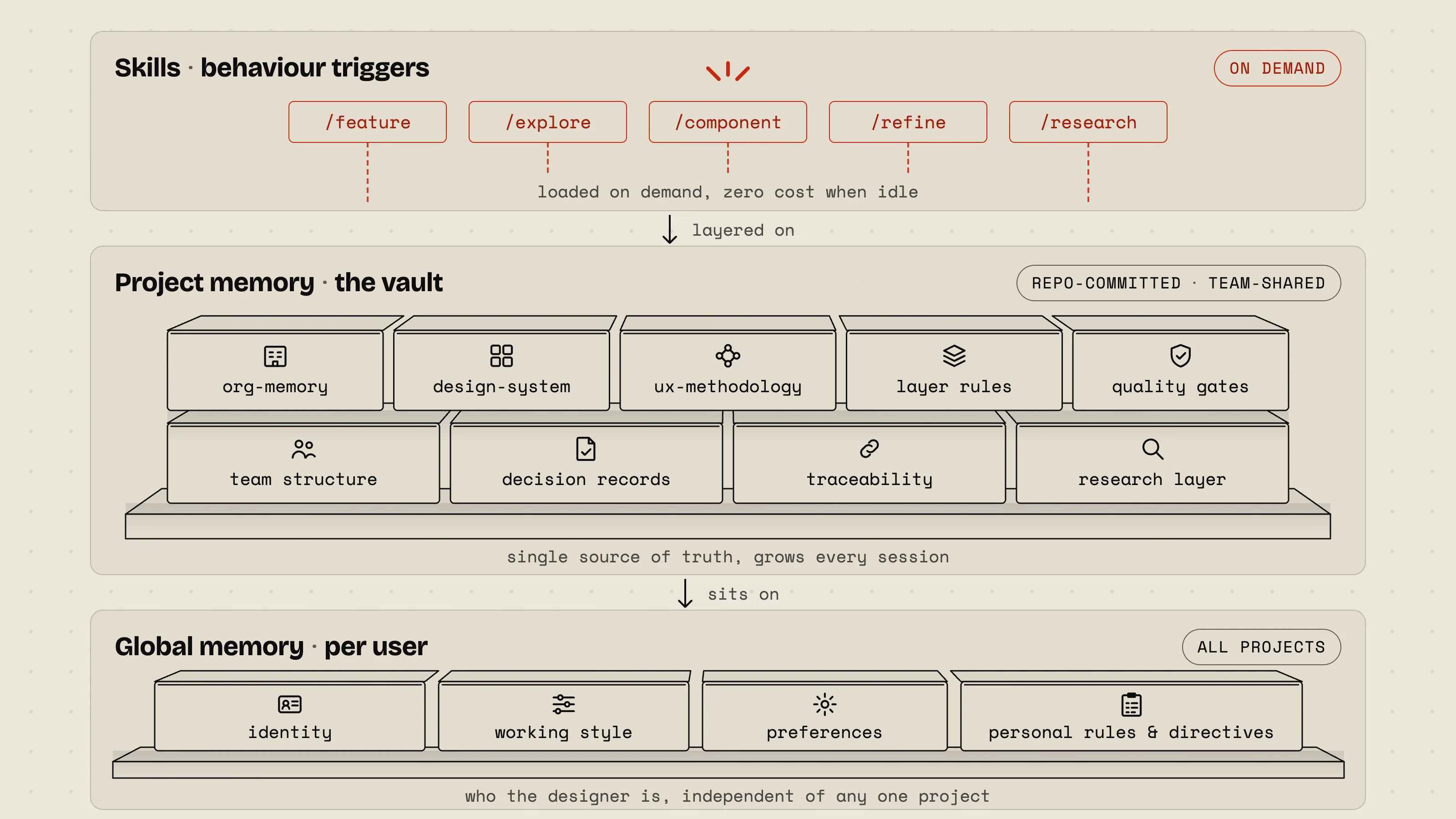
B · Five activity skills
A designer doesn’t write one giant prompt. They pick a mode. Each activity skill loads the exact context and runs the exact pipeline its kind of work needs. (See the next section.) All five sit on a shared base of team memory, design-system rules, and UX methodology, so output is consistent without re-explaining the system each time.
C · The three-layer model · the spine of the code
The most consequential rule in the codebase. Every piece of UI belongs to exactly one of three layers, and the layers may only depend downward. It’s what keeps the design system reusable and makes a designer’s output safe to merge.
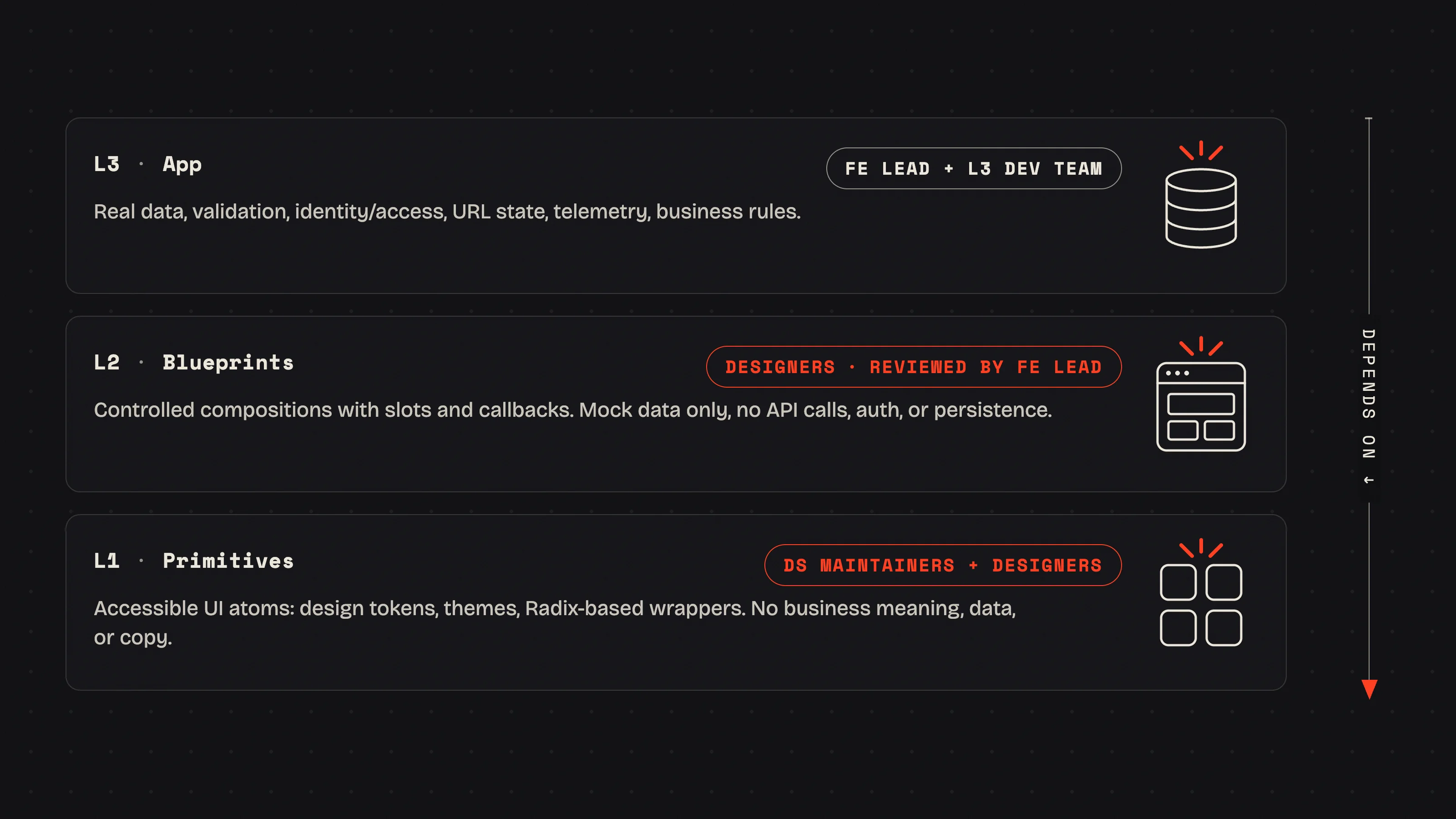
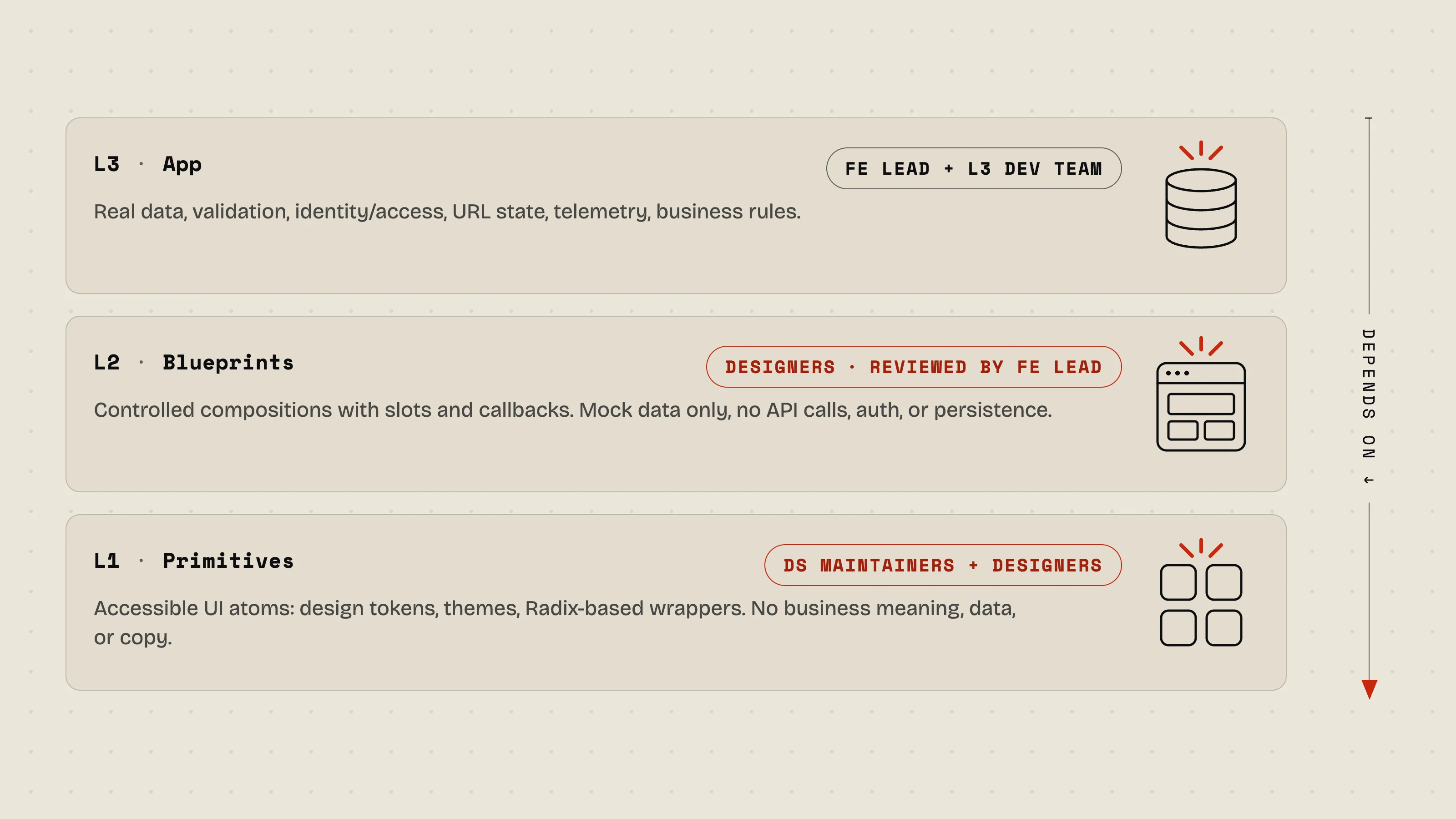
Dependency direction is sacred: L3 depends on L2 depends on L1. The reverse is forbidden: a primitive may never import a blueprint; a blueprint may never import app code.
The activity modes
Five ways to start, each with its own pipeline.
The designer chooses the mode that matches the intent. Some produce real, mergeable deliverables; others are for thinking, validating, or asking the research layer before anything is committed.
| Mode | Use it when… | Produces | Merge path |
|---|---|---|---|
| feature | You have a UI feature ticket and are building a production screen. | HTML visual spec · design doc · live 1:1 app replica · committed code. | PR → reviewed by FE Lead → merged. |
| component | You’re building or extending an L1 primitive in the design system. | Component code · Storybook story · unit + accessibility tests · token-only styling. | PR → published to the package registry. |
| explore | No ticket yet, you’re searching the problem space for direction. | Raw exploration: sketches, concepts, multiple directions. | Discovery only, no PR, no handoff. |
| research | You need to know what users actually said. Every feedback and user-testing session is logged into the system and queryable. | A sourced answer drawn from the research layer: sessions, quotes, patterns. | Insight feeds the work directly; nothing to merge. |
The refine mode handles post-review changes. It detects which artifacts already exist and which branch scenario applies, so the designer never has to diagnose state by hand after feedback comes back.
Team & ownership
Clear roles, and one hard boundary that makes it work.
The workflow spans two teams with a single, enforced line between them. Designers own everything up to and including the blueprint layer. The data layer, and the right to merge, sit with engineering.
| Role | Responsibility in the workflow |
|---|---|
| Designers | Run sessions and build real UI (L1 + L2) from tickets. Own the design system and all design/* branches. Maintain the project memory. |
| UX Manager | Owns the backlog and research strategy; runs cross-team meetings and logs their outcomes into project memory as date-stamped constraints. Can also build features like any designer. |
| FE Lead | The design-side quality gate. Reviews every design build for standards and integration fit, and is the sole merge authority for design branches. Never authors design work. |
| PM / Product | Writes the tickets designers work from and signs off features against acceptance criteria. |
| L3 Intake / Dev team | Receives the merged handover package and wires the real data layer for production. |
The hard boundary
Designer territory
design/{name}/{feature}· feature work- Design system: components, tokens, themes
- The project memory file
- Layers L1 and L2
Dev territory
develop,main,feature/*,fix/*- The real data layer (L3)
- Merging design PRs
- API integration, identity, persistence
The boundary is a hard rule. The dev team never silently edits a component, token, or theme. If a developer disagrees with something in a design PR, it goes back to the designer with a comment, never changed in place. Design decisions stay with designers.
Artifacts & the quality bar
What ships, and the standard it has to clear.
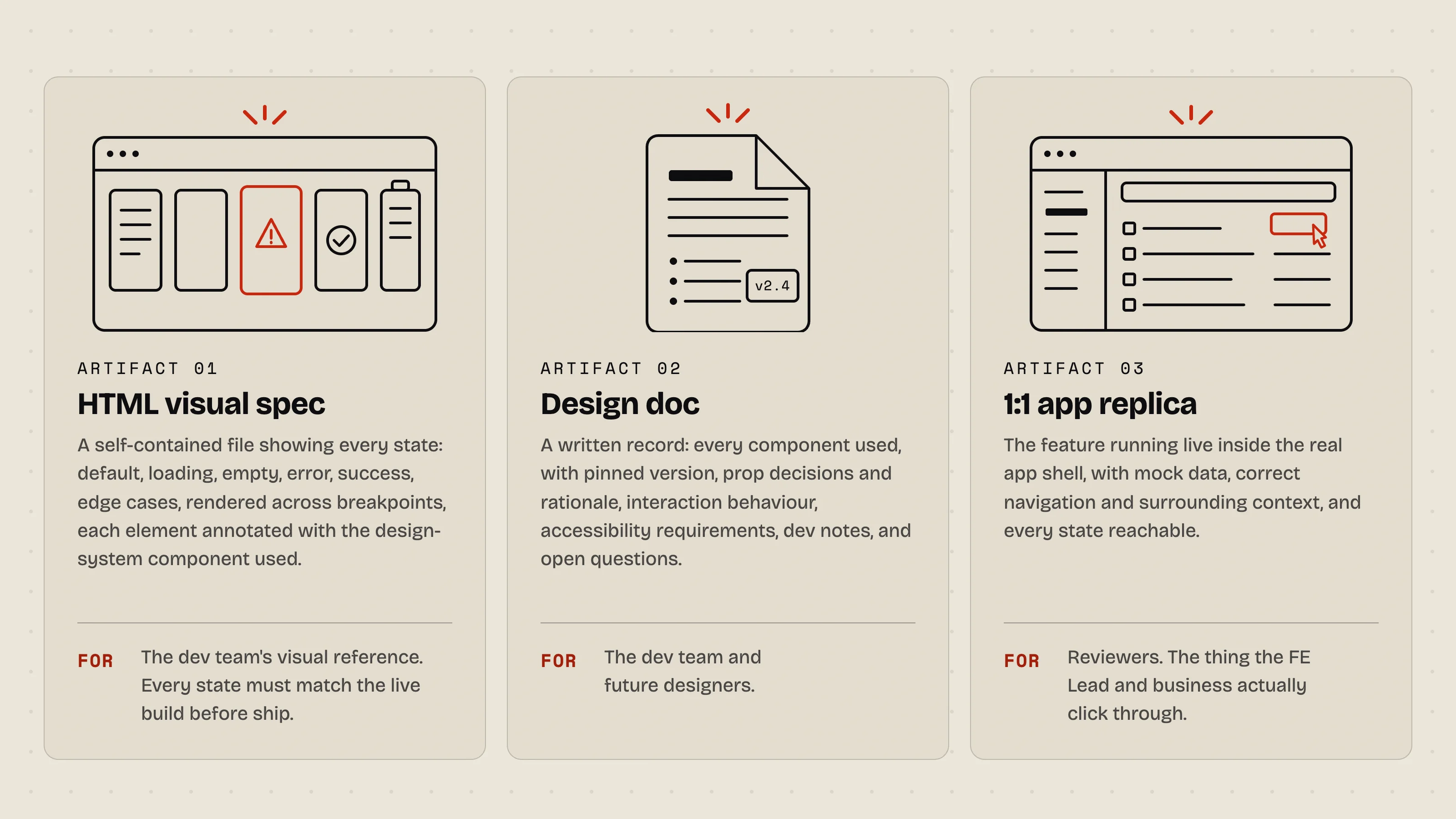
Every feature produces three artifacts
Before a feature can be reviewed, the session has to produce all three:
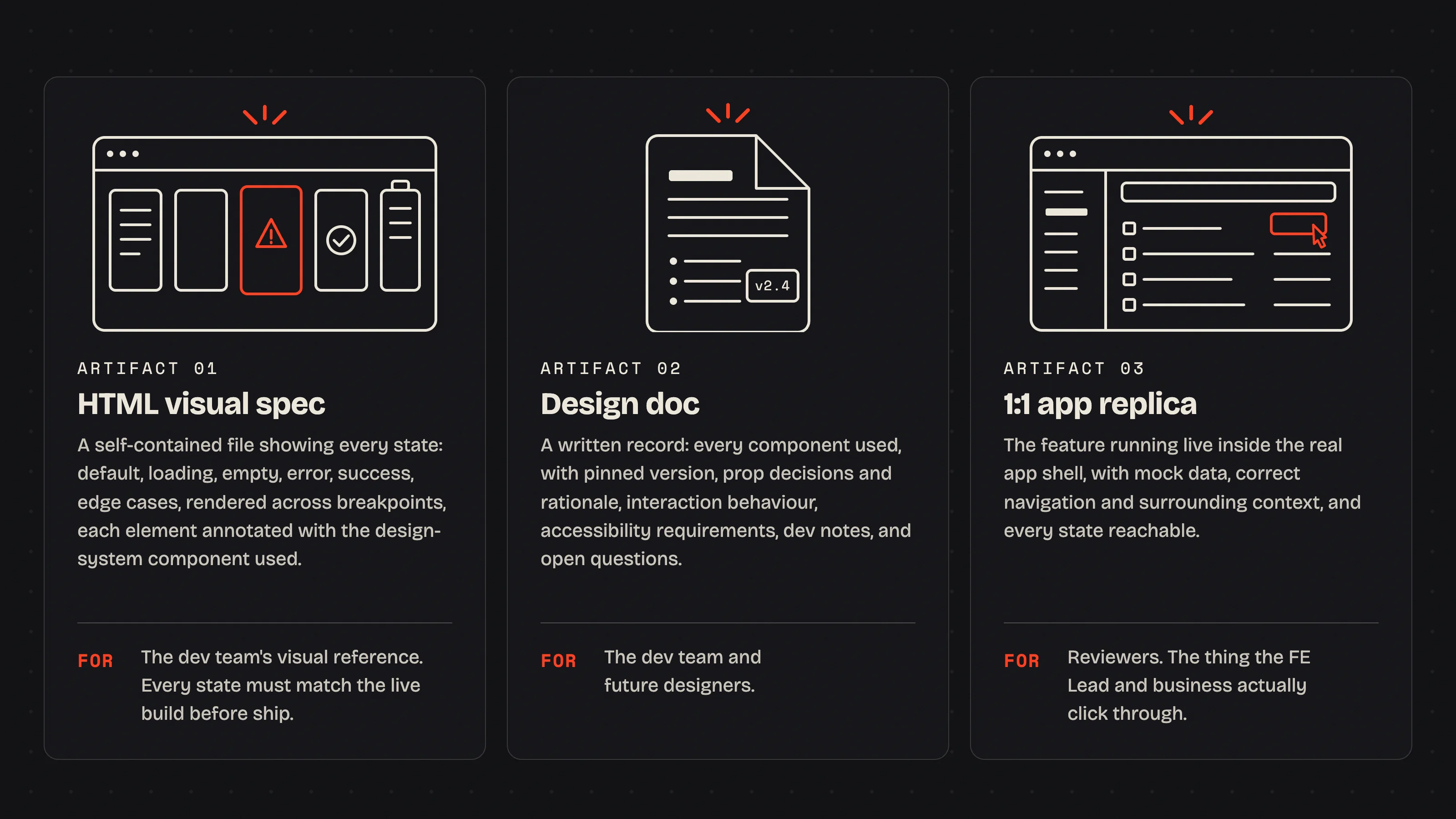
The rules every build has to pass
All of them are enforced by automated checks and the agent’s instructions:
- Every style value flows through a design token, with a fallback. A single literal value breaks the theming cascade for that component across every client theme, so an automated scan flags hardcoded colors and sizes on every file write.
- Accessibility is a release blocker, not a polish item, with WCAG 2.2 AA as the target: keyboard navigable, correct roles and names, visible focus, sufficient contrast, color never the sole signal. Automated accessibility tests run as a gate.
- Every state is designed in from the start, default, loading, empty, error, success, and the edge cases.
- Only design-system components are used, never one-off styling; if a needed component doesn’t exist, it’s raised as a gap and built as a primitive first.
- Every build follows the established UX heuristics, a single primary action per view, labels above inputs, never a placeholder as the label, destructive actions always confirmed.
Without the quality bar
- Hardcoded values break theming silently
- Accessibility caught late, or never
- Happy-path only; states found in production
- Inconsistent patterns drift across screens
With the gates built in
- Every value themeable by default
- Accessibility verified before merge
- All states designed up front
- One design system, applied consistently
The standard holds because enforcement lives in the system itself: rules in the agent’s instructions, automated scans on write, and test gates in CI. Quality stays structural instead of depending on anyone’s memory.
Quality at speed, because the discipline lives in the system.
Every safeguard a senior team relies on is built into the workflow itself:
- The output is real code, reviewed and merged by a front-end lead.
- There’s a real review gate, with single merge authority, hard ownership boundaries and business sign-off against acceptance criteria.
- The memory compounds, every session writing its decisions and patterns back into the shared vault, so the next one starts richer.
- The agent refuses to drift, and won’t ship something that conflicts with a past decision, uses the wrong token, or strays outside the ticket’s scope.
The distance between a designer having an idea and a developer seeing working, accessible, on-system code collapses from days to hours, and the designer’s role shifts from producing static deliverables to producing live, production UI.